Sunday, March 31, 2019

Recording/Editing our Film Opening

Hey guys! Ever since the day we started thinking about our film opening, we planned on using the first shot as an establishing shot. This would be showing Lucy's living room and the news broadcast would be playing on the television. But when we started filming, we realized that we should start it off with a more appealing shot like the one we did. We started it by using an extreme close-up of the remote control, with the camera focused on it, and the background would be blurred out. Down below is the shot that we decided to use for the beginning of the film opening.


Something else that we didn't do from the storyboard was the use of the tracking shots that we planned on doing. We didn't do these shots because of the fact that we didn't have a tripod to make the shots stable and professional looking, we were doing them handheld, which is very risky. What we did was we used a combination of different shots of Lucy's walking from and to different places from different angles. We did use a tracking shot though, when Lucy went into the bathroom and turned on the shower and then her phone rings, all of this was one continuous movement of the camera. We did a one-take shot which took several tries, but then we finally got it. Down below is this tracking shot that I mentioned above. 

Now moving on to the editing portion of the film opening. I have been using iMovie for years and I am very comfortable using it since I know how to do everything. First of all, we had to place all of the clips in the correct order and then shorten the beginnings and ends of them in order for the video to be continuous.  When Lucy was walking to the couch from one angle and then when it would switch to another angle, we had to make sure that the actions flowed. Then with the tracking shot we didn't have to worry about the continuity since it was taken all in one shot. But then, at the very end of the film opening, the clip where Lucy had her eyes closed and no makeup, and the other clip when Lucy suddenly has the veins drawn on and she opens her eyes and she has the red contacts on, needed to be precisely connected so that there wasn't a noticeable cut in between the two. 


Next, this was by far, the hardest and most annoying part of the whole editing process. This was making the text messages pop up on the side of the video. Since we knew we were going to include the text conversation on the screen on this video, we made sure to use the rule of thirds to make sure that Lucy was to the left of the screen and leave an empty space on the right side where the text messages would be popping up. Since the start, we knew that we were going to use the application After Effects to make the text-message conversation appear on the screen. SO, both my partner and I signed up for the free trial and began playing around with it in order to make the conversation. After an EXTREMELY long time trying and trying, we realized that it was too hard to use this application. We thought it was over and we were getting scared. But then we thought of searching up on YouTube how to do use this complicated app, but we still had lots of difficulties. Thus, we decided to try a different way. We decided we would use a app on my phone called Fake Conversation in order to make the fake group chat. In this fake group chat I was able to add images to each name and name the group chat "Girliesss" with many feminine emojis at the end. I saved this screen recording and then layered it over the clip of Lucy texting. Then I placed the conversation to the right of the video to make sure that both of the sides were visible. Down below is the final product of the text message conversation. 


Moving on to the music and sound effects. For all of the sounds that were made in the video, we remade those sounds and recorded them on my phone. For instance, the sound effects of Lucy typing, the typical iPhone SMS messages sound when they send or receive, the typical iPhone ringtones (Marimba), and the shower turning on. We recorded these sound effects ourselves by recreating them because it was more efficient than having to search online for royalty free sound effects and they might not even sound realistic. What we did is my partner would perform the action of the sound effect and I would record it. Such as, she would turn on the shower, or she would type on notes to get the texting sound we wanted. Then, we placed these sound effects in iMovie and aligned them perfectly with the part of the video the they needed to be in. The hard part about this was having to align every single message that was sent and received with their specific sound effect because they would go really quick and the alignment needed to be perfect. We muted out most of the real sound from the videos since the background noise would have been too loud and it would take away from the tension that the silence creates in horror films. The only video clip where we left the actual audio in is the part of the news broadcast because we wanted it to sound realistic.  After rewatching our film opening over and over again, we knew that there was more potential for it. Yes, it sounded really spooky for the film to silent most of the time, but we felt that with some suspenseful background music, it could sound even better. We searched and searched online for royalty free suspenseful music, but there weren't any that we truly thought fit for our film opening. So, we heard some of the iMovie music and found the perfect one, it is called "Drone Dark Suspense 1" for the background music throughout the whole opening. The last sound effect that we added was at the very end when Lucy opened her eyes and became possessed. We used the sound effect  "Creepy Transitions (152)" from the website  https://www.soundsnap.com. Lastly, we added our title "The Call" to the end to the film opening. We left the sound effect of the shower until the title on purpose. This is because it leaves the audience with tension and wondering what happened to Lucy. 


Friday, March 29, 2019

Coming up with our Movie Title

Hello! We have been thoroughly thinking about the title of our Movie. At the end of our film opening we will be including the title of our made up Movie. We have researched names of scary movies and we have found the pattern that most movies in the horror genre have one or two words as the title. The titles are almost always simple and short. Some examples are "It", "Us", "Get Out", "The Nun", "Sinister", "Insidious", and the list goes on and on. Thus, since our movie is mainly based on mass-suicides that are caused by receiving a call from a "friend" and that is when the spirit gets inside of you and makes you want to kill yourself, we came up with the title "The Call".

Moving on, we have also gone through many fonts and colors for the title and we have come up with the perfect one for our film opening. For the font, we were looking for a font with letters in all capital letters because it makes the words stand out more and it makes them more dramatic. We also were inspired by the movie titles of "The Nun" and "The Conjuring" because they are both very successful and well known horror movies. The titles of both of these movies include all capitals letters and different sizes of the letters. We also applied this to our title because it adds to the creepy and disturbing vibes. My partner and I used the website https://www.font-generator.com/.


This is the first font that we created, it doesn't really have all capital letters or different sizes, but we thought that the first T had a really unique look to it. The letter h is in lowercase and I HATED that.  We then thought of all of the other letters and ended up not liking this one at all, because it is really simple and the only good part about it was the first letter. 


This is the second design that we came up with. It has ALL capital letters and the creepy different sizes that we wanted. The only thing that we didn't like was the color of the background and the color of the font. But we learned how to fix it and we adjusted it to how we wanted.


THIS IS IT. This is the title that we will be using. It has all of the aspects that we want in it and more. It is red because the color red is associated with death and blood which you can't go wring with when dealing with a horror movie. It also is red to match with our lead actress's color contacts which will be the last thing the audience sees before the title is displayed. It also has a black background which will help in blending this image of the font into the black background of the ending of the film opening.


We will be including the title screen at the end of the film opening, and there's an explanation for that. When the lead actress, Valentina, answers the phone in the last part of the last scene, she will be looking down. Then, we will have her open her eyes and do a close up shot of the red colored contacts that she will be wearing. She will then collapse to the floor, and the screen will go black. This is when the title will appear. The red will pop out with the font and the contacts, which adds to the horror genre aspect of our movie.


Thursday, March 28, 2019

Finalizing Main Character's Appearance

Today we filmed most of our film opening. Our main character Valentina, or Lucy (her name in the film), wore our Regina George inspired outfit. She wore a black short skirt, a pink short sleeve with a pink blazer over it, and some black flats. I think we totally nailed the popular girl look!


Another huge aspect of her appearance was achieving the possessed look with makeup and the red contacts. I ordered the red contacts on Amazon, and payed for next day shipping so that they could arrive by the filming date. Of course, our luck wasn't very good. The package got lost and we had to end up returning it without it arriving.


SO we had to think of a solution to this HUGE problem. We thought, we can't film this opening without the contacts because they totally complete the look.  So we thought of looking for stores around where we live that might sell them. We called over sic different stores, and they all said that they were available online, but we had no time for that. Then, I had the AMAZING idea of using a snapchat filter. Snapchat is a social media platform that has many different filters that change the appearance of your face. There are also COLORED CONTACTS, the usual ones that people use are blue or green, but we searched up RED colored contacts, and they were there. PROBLEM SOLVED. We were so excited and relieved because this possessed look is what truly completes the film opening.

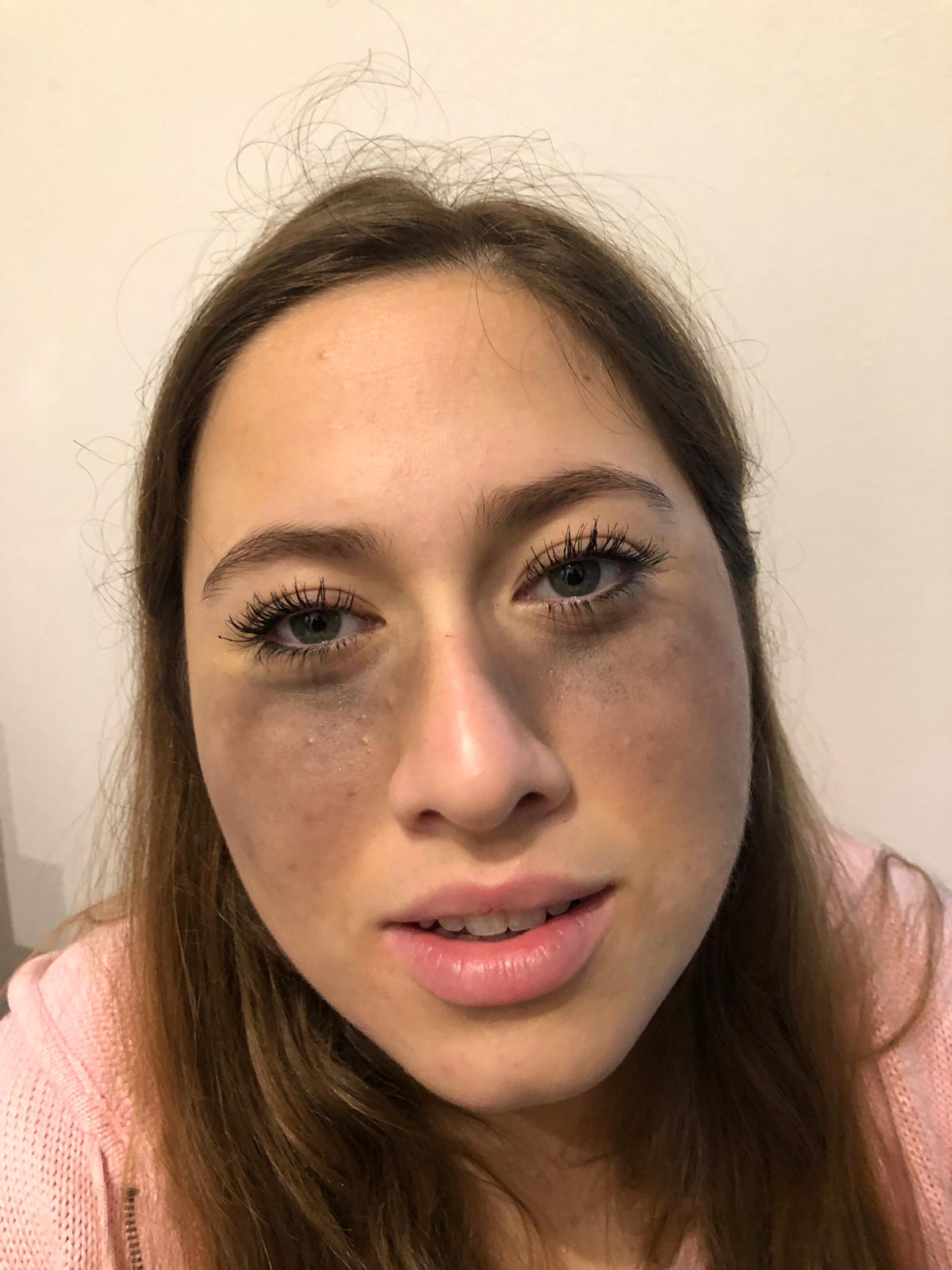
Another small issue that we had is that Valentina didn't really want us to do the possessed makeup look on her, at the end she let us though. We struggled in putting all it on her, but in the end it looked extremely realistic. We started off by putting a layer of brown eye shadow under her eyes, then some dark red and lastly, black. We added some eyeliner in the shape of branches for the veiny look.  Here is the process down below.


As you can tell from these pictures and videos, she wasn't very excited to have all of this on her face, but as long as we got the clip for our film opening, we were set. We started off with some problems when using the snapchat filter because when you tilt the camera sideways the contacts wouldn't show up on her eyes, so what we did was he started off placing the camera vertically and then tilted it sideways slowly to make sure they wouldn't misplace her eyes. Then we filmed the ending to our film opening and it was exactly what he hoped for.


Tuesday, March 26, 2019

Filming and Editing the News Broadcast

Welcome back! On Thursday we finally recorded the news broadcast at my house. My house is filled with white walls, and my partner's isn't which is why the filming took place in my house. We started off by getting dressed in the professional outfits (fancy top with a blazer over it) that we had planned, and did our makeup as well. We were planning on using red lipstick, but we could only find a hot pink one to use.

Then, we forgot to ask our teacher if we could borrow her tripod, so we had to use what we had. We placed five textbooks on top of the table and then held up the phone with a candle. The table we used was my glass dining table, using this modern table would give our news broadcast a more realistic and nowadays look since we are trying to portray that the event it is happening currently. We used a white wall as the background, but we regret doing that since it looks very plain and not much like a news broadcast. We were going to use a projector to display an image of a city or a map, but we weren't able to find one. 

Right below the camera we placed my computer with the script of what we each had to say, a teleprompter. It was a bit of a struggle at first since we didn't want it to look like we were reading off of the script, but we also didn't want to memorize it. What we did was we would read it before we would say it, so that would be prepared to say it while looking at the camera. Another issue that we ran into was staying serious, since we had to dramatize our tones to sound more professional and the topic we are covering was mass-suicides which isn't something you can be smiling about. We sat up very straight with our hands crossed. Also, we placed 2 identical mugs, paper, and pens to mimic a real broadcast. Down below is some raw footage of the news broadcast.


Down below is the edited version of the news broadcast. We used the application iMovie to edit this since we are more familiarized with the techniques and buttons of it. Whenever we made errors in saying the script, we just repeated what we had just stated and then with editing we cut the bad one out. We accomplished to make the cuts look as continuous as possible. To make the news broadcast layout we used an effect which made it look really professional and realistic. We already inserted the clips of the chaotic running in the mall, but still need to include the images of the empty water bottle isles which I still need to look for in the camera roll of my old phone.


Sunday, March 24, 2019

Filming Setbacks

My partner and I made a schedule for filming and editing that we were planning on following. But unfortunately, we are not on schedule. School is a huge part of our lives and our studies have really gotten in the way of filming our film opening. We have been very busy with SATs, the third quarter ending and a lot of grades being put it to define our overall grade for the class, and our jobs. We have created a new schedule which is very day to day since we are on spring break this week and we have a lot of time on our hands. My partner and Valentina can work with this schedule that is down below.

Saturday, March 23, 2019

Editing Chaotic Scenes for the News Broadcast

Last week, when we went to the mall to get some clips for the news broadcast, we achieved the look that we wanted in terms of the shakiness of the camera to make sure that it looked as chaotic as possible. There were many videos that we took and we have finally decided on the one that we want to use. There were many problems with the other videos that I took that are unfixable with apps or editing skills since they have to do with the way they were filmed and the content that was taken. Down below are three of the ten videos that we took.

The first video is one of the first videos that we took, it started out fine, but as it went on I shook the camera too much, which made the the running unclear and you can't really tell what is going on. The second video, is perfect. It is the one that we will be using for the news broadcast, since it has all of the aspects that it needs. It has a lot of people surrounding the runner and the camera shakiness is accurate. It has the perfect chaotic look that we are looking for and it actually looks like people are in a desperate search for survival. The third video, was also taken into consideration, but the problem with it was that there weren't many people around the runner which doesn't give the clip a feel that there are mass-suicides going on.


Even though the second video is perfect for the news broadcast, it still isn't at its full potential. With editing and sound effects this video can look extremely realistic and give it that chaotic feel that we want in the film opening. For the editing, we searched for many apps and website and found one that was called "Camcorder". This app will give the video a more homemade look which is what we need because it has to look like a bystander is filming the chaos that is going on. In a future post I will include more information on the sound effects that we want to add onto the videos. Down below is the video with the special effects.


Friday, March 22, 2019

Ending Scene Makeup

The ending scene of our film opening is a very dramatic one and it needs alarming makeup to go with it. What is happening in this scene is that Valentina, the lead actress, is going to be going into the bathroom to take a shower and she will set her phone down on the bathroom sink and turn the water on. She will then receive a call from her "friend" but that friend will have already been possessed by the evil spirit. Then, when Valentina answers the phone, she will be immediately possessed by it as well. Moreover, the makeup that I was thinking about doing is a very horrific one that I have seen before in a show that I watched. In the show Vampire Diaries, every time that a human turns into a vampire they begin to get veins under their eyes and their eyes become very dark and their eye color turns red. Even though Valentina isn't going to be a vampire, it is still a perfect look to make sure that the audience can tell that she has been possessed.

The image above is the exact look that we want to achieve on Valentina. I will most likely be doing it since I'm better at doing makeup than my partner and it will look better and more professional. I plan on using black eyeliner for the veins under the eyes and a lot of red blush on her cheeks to make it look darker. For the most important part of the look, the red contacts. Since we have started thinking about this idea of using red contacts, we have been planning on buying them online. But after thoroughly researching, we realized that this would not be the best option for us since it would take a couple of weeks for them to arrive. So, we have looked up places to buy them in the store around where we live, and there are halloween stores in Miami which is about an hour away. I will be going to Miami this Wednesday and I am going to purchase them. The ones that we want are just plain red or red with veins in them, any that I find are going to be perfect for the scene. These images below are the two types that I am talking about.


Reflection

Hello everyone! My name is Sophia Jauregui and I was a part of creating the film opening for “The Call”. My partner’s name is Giuliana Ri...